5x Faster Video Export by Ditching the DOM
The Problem: Client-Side Video Export That Takes Forever
For this SaaS I created called MockClip (opens in a new tab), the end product are HTML videos. Therefore, I wanted to handle the export process entirely on the client side, so that I did not need to incur infrastructure costs. That means, there must be no server, video upload or cloud processing involved. The browser from the user device must do the whole work. There are more reasons than just infrastructure: privacy and offline capability.
Sure, for an app that is geared towards creators, maybe privacy is not a big deal, considering the content will end up online anyway, but many users actually want the possibility to work offline. Additionally, the user must see the video being exported while the export is taking place, as it is a common practice with video editors to show the video being rendered.
And, of course, I made it work. Except, it was (obviously) too slow. The performance was disappointing, to say the least. For a 16 second video at 720p @ 24 fps, nothing extraordinary, the export took some incredible 55 seconds. That is a minute of possibilities for a user to bounce away from your SaaS when they are used to not wait for anything. By ditching the DOM and achieving a 5x performance improvement, we reduced this to just 11 seconds:
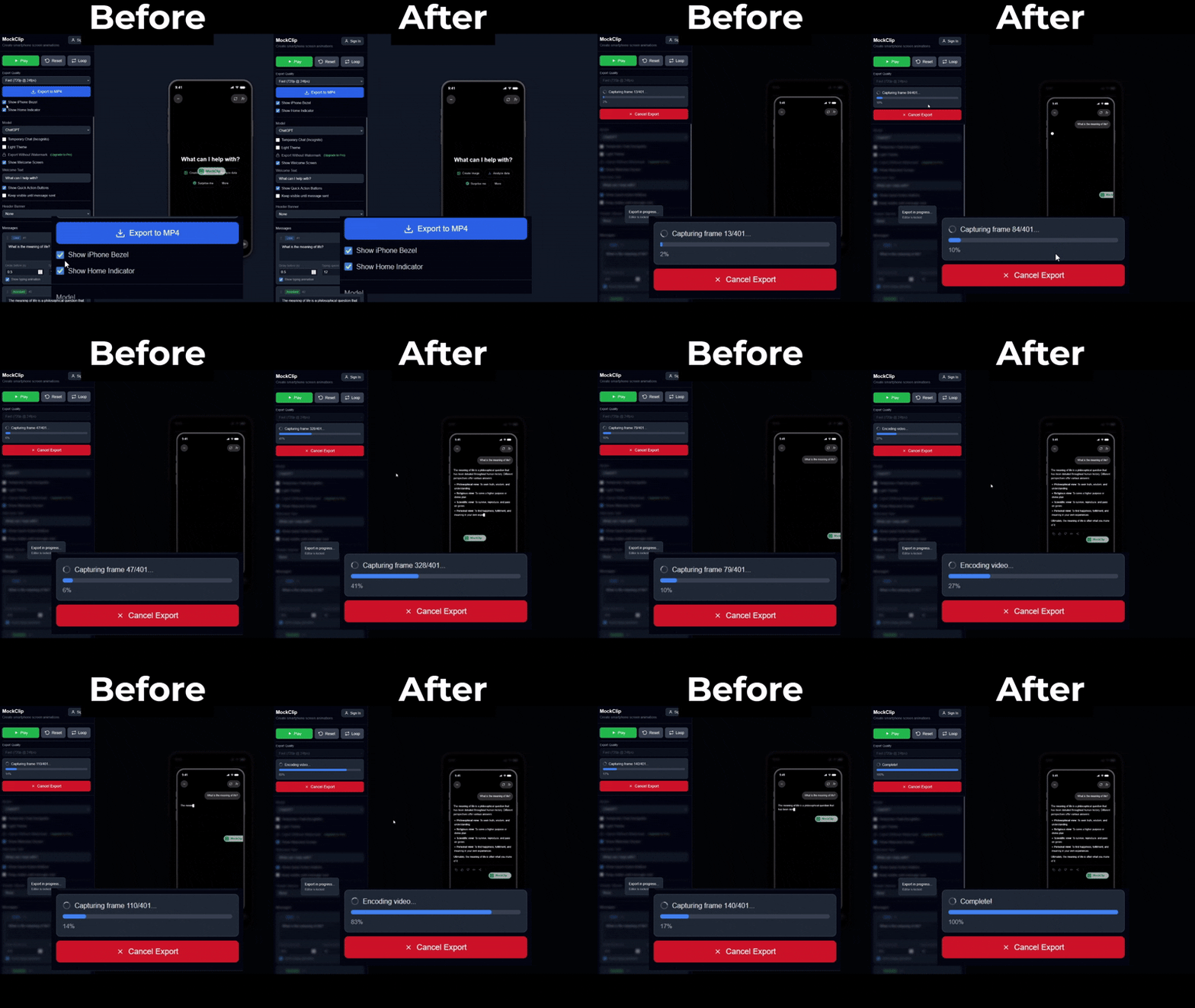
Let us look at the current solution under the hood. Each frame gets processed into an image, then all images get stitched together and the video gets put together via FFmpeg. This is not the most novel solution, as we could have used WebCodecs, which provide native browser video encoding, but this feature contains a major flaw: support. Safari only added support in 16.4 (March 2023), and Firefox support is still experimental. The whole point of developing web apps is that they work virtually everywhere, so the last thing I wanted was to add a browser to the requirements to use the app.
That leaves us with an issue at hand that needs solving, as export performance is key for user experience.
Why html-to-image Is Secretly a Performance Killer
As stated previously, the current approach relied on turning the DOM elements into images, which is easy to set up, but comes at a huge performance cost.
The toPng function from the html-to-image (opens in a new tab) library works as follows:
-
Serialize the entire DOM subtree
-
Inline all computed styles (ALL CSS properties)
-
Wrap the whole thing into an SVG foreignObject
-
Render the SVG into a canvas
-
Export the canvas as a PNG
For the mentioned 16 second video at 24 FPS, this process was done 401 times. The bottleneck is clear. Even I got tired from writing all that. And the problem did not stop there. On top of this long process, we were also converting the base64 result into a Blob.
/**
  * Capture a single frame from the container element
  */
async function captureFrame(
  element: HTMLElement,
  width: number,
  height: number
): Promise<Blob> {
  const dataUrl = await toPng(element, {
    width,
    height,
    pixelRatio: 1,
    cacheBust: false, // Disable cache busting - we control state deterministically
  });

  // Fast conversion: direct base64 decode instead of fetch()
  const base64 = dataUrl.split(",")[1];
  const bytes = base64ToUint8Array(base64);
  return new Blob([bytes.buffer as ArrayBuffer], { type: "image/png" });
}
But the problems with this toPng function do not stop there.
Additional Problem: Main Thread Blocking
Of course the problems would not stop there. The toPng function blocks the main thread, while in the steps 1 (DOM serialization) and 2 (styles computation). This means nothing in the UI will move until these steps are through.
This creates a new challenge when you are relying on capturing the frames at precise timings, just as we are on MockClip (opens in a new tab), via setInterval (with the defined framerate, as we support also 60 FPS). Since the animation freezes on the evil toPng function call, the animation will freeze at the point of capture and then jump forward creating a good mess.
Here are some of the solutions attempted to make that work:
-
Adding delays with setTimeout - Just delays the inevitable problem
-
Web Workers - Could not access the DOM, bad considering DOM serialization is one of the key pillars of the html-to-image library
-
requestAnimationFrame - Does not work while the main thread is blocked by the toPng
-
Reducing DOM Tree Size - Minor improvements. The overhead from the serialization process was more of a pain than the size of the DOM tree being processed
The issue at hand is that we are attempting to record an animation with a frame-by-frame capture method, that blocks the execution. The sole concept of an animation is a group of frames that do not block. So, we have successfully achieved rock bottom.
Animations Are Math, so we Can Use a Canvas
The good thing about rock bottom is that there is only one way: up. Once we are exporting animations, there is no edit. The animation at each point is deterministic, and does not depend upon the previous frames. As long as we know the position of each element, we can recreate any frame. That means, we can completely get rid of this DOM processing nightmare called toPng.
Therefore, while exporting, we can just check the timestamp of that frame, compute the UI state at that frame, capture the frame, and move to the next one. And the glue holding it all together? A canvas pipeline.
// The key functions
const timeline = buildTimeline(animationConfig); // Pre-calculate all events
const state = getStateAtTime(timeline, 14458);   // What does frame 347 look like?
renderToCanvas(canvas, state);                    // Draw it
Building a Canvas Rendering Pipeline from Scratch
Now that we have a solution, it is time to get to work. What do we need? A complete do-over of the rendering pipeline, this time into a canvas, through ctx.fillRect().
Of course, I used OffscreenCanvas (opens in a new tab), as we can separate the rendering from the main thread, avoiding the dreaded issue we were having where the UI would freeze. In this case, we will use the preview to keep users entertained and match it to the frame currently being rendered, similarly to an actual video editor experience.
As the next step, I built a small rendering library, drawing the necessary shapes, texts and images (including the iphone icons, to provide the phone experience). It was way more work than the previous implementation of toPng, but the results were astonishing... except our work was not done yet.
Replacing Framer Motion Animations in Canvas
Why? The preview from MockClip (opens in a new tab) uses Framer Motion for the animations. Beautiful and smooth, and do not work in canvas. Therefore, all the effects we were using from it needed to be translated into... math. Just pure math.
Luckily, that is already a well explored field. For our app, these were our targets (at least for now. We will need to add more with new apps):
- typingPulse - 2s cycle, easeInOut, scale 1.0 to 1.3
- spinner - 1s linear rotation (360°)
- imageBlur - 2s cycle blur/brightness pulsing
- imageReveal - 0.5s easeOut blur to clear
With this, we keep the deterministic approach to the video. Whenever we ask for a frame, we can also map the exact point where our animations should be.
As for images, preload them all before the render loop starts. I built an image cache that extracts them and loads them in parallel. During rendering, I just need to pull them from the cache.
The remaining part (FFmpeg WASM) remained the same. Only the PNG generation changed.
The Results: Numbers Don't Lie
Now, to the most important part: the numbers. How good of an improvement did we get? Well, the numbers do not lie:
| Before | After |
|---|---|
| 55 seconds | 11 seconds |
That is basically a 5x improvement. From one simple architectural change, we have drastically improved user experience.
Key Takeaways
In essence:
-
DOM capture is slow, and it cannot be optimized, so it was best to get rid of it.
-
Considering HTML animations are (usually) predictable, they can be computed instead of captured.
-
Canvas is faster, but harder to implement and maintain. Are your users worth a 5x improvement? I think so.
Just as a closing thought: these are the best 800 lines you will ever write. Your users will thank you 5 times for it.
Want to see the results? Try MockClip at mockclip.com (opens in a new tab), and have fun with the blazing fast client-side exports!
Building in public. Follow my journey at InvisiblePuzzle (opens in a new tab) where I document the technical challenges of building web apps as a solo developer.
Tags: #javascript #performance #canvas #webdev #optimization #video #ffmpeg
Get notified on new posts
No spam. Unsubscribe anytime.